color printer test page
Color Printer Test Page for CMYK, Lines & Banding
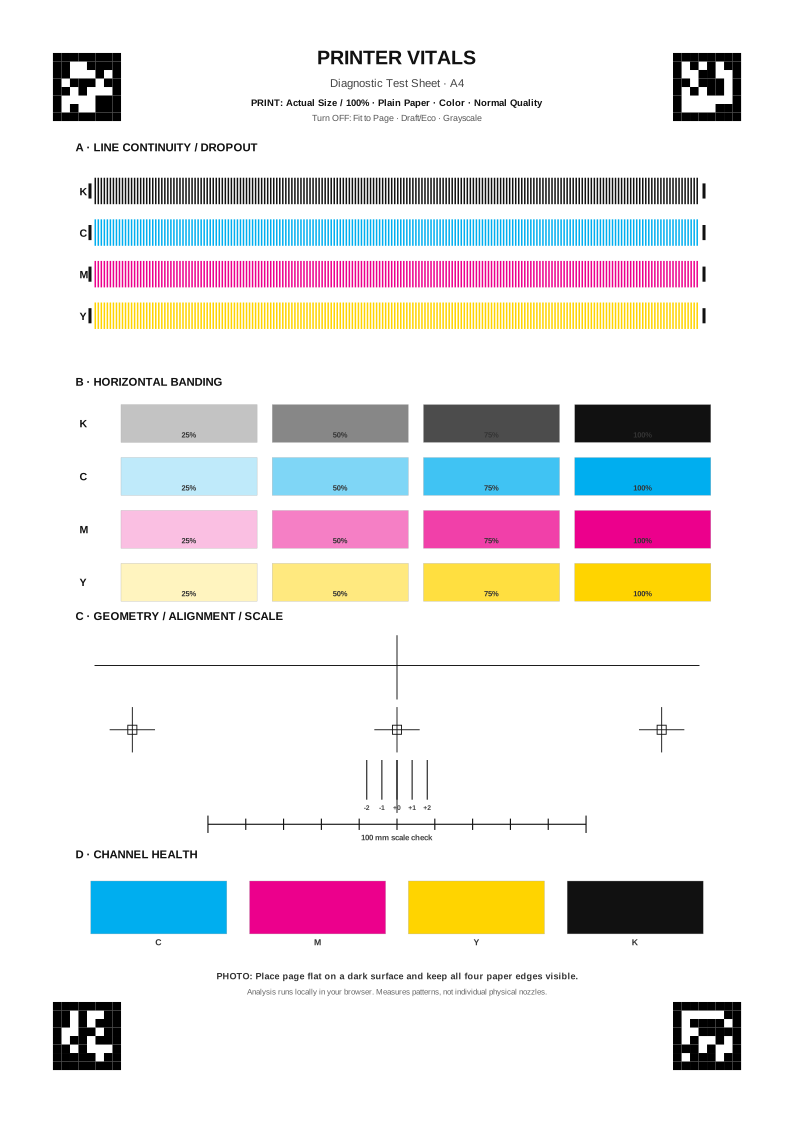
Need a color test print now? Download A4 or US Letter below. The sheet separates cyan, magenta, yellow and black and includes patterns for line continuity and horizontal banding.
What is on the color test page?
| Area | What it gives you |
|---|---|
| CMYK line rows | Known black, cyan, magenta and yellow line elements for spotting missing or broken output. |
| 25/50/75/100% tone fields | Four density levels per channel so repeated horizontal variation is visible outside a single solid patch. |
| Geometry references | Printed references used by the analyzer to estimate scale, rotation and offset relative to the paper. |
| Solid CMYK fields | A second signal for grossly weak or missing color channels. |
Print settings that preserve the test
- Choose 100% / Actual Size; do not use Fit to Page.
- Use Color mode and Normal/Standard quality rather than Draft/Eco or Grayscale.
- Use plain white paper for the baseline so a later retest can use the same conditions.
What this page does not test
This is not a color-calibration target. A phone camera and consumer printer test cannot replace a spectrophotometer, ICC workflow or Delta E measurement. Printer Vitals only uses the color fields for coarse relative channel-health checks.